 how-to
Custom Security Solutions for Small Businesses
Table of Contents
- Why Off-the-Shelf Security Fails Small Businesses
- Start With a Business Security Risk Assessment
- Choosing Small Business Security Systems That Scale
- Where Commercial Security Guards Fit Your Plan
- Mobile Patrol Security for Businesses With Multiple Sites
- Budgeting and Total Cost of Ownership
- Vetting a Provider and Keeping the Plan Effective
- Frequently Asked Questions
Last Updated: October 18, 2026
Why Off-the-Shelf Security Fails Small Businesses
A boxed security kit protects a generic building. Your building is not generic.
Most small businesses find that off-the-shelf systems fail for three reasons. First, coverage is fixed, so cameras and sensors land where the box says, not where your risk sits. Second, alarm-only setups generate false alarms that erode police response over time.
That is the core argument here: equipment is the cheap part. The plan, the response, and the people behind it decide whether a system works.
Start With a Business Security Risk Assessment
A business security risk assessment is a structured walkthrough that identifies what you are protecting, where someone could get in, and which gaps current measures leave open. It comes before any quote, not after.
Here is how a business security risk assessment is typically run:
- List the assets. Cash, inventory, equipment, records, and people, ranked by what a loss would actually cost you.
- Map every entry point. Doors, windows, roof access, loading docks, and the parking area. Include the ones staff use informally.
- Test the lighting. Walk the property after dark. Note dead zones in the lot, alley, and rear entrances.
- Review the current setup. Where are cameras aimed? Who watches the footage, and how often?
- Score each gap. Rate likelihood and impact on a simple 1-5 scale, then fix the highest scores first.
Mapping Entry Points, Assets, and Coverage Gaps
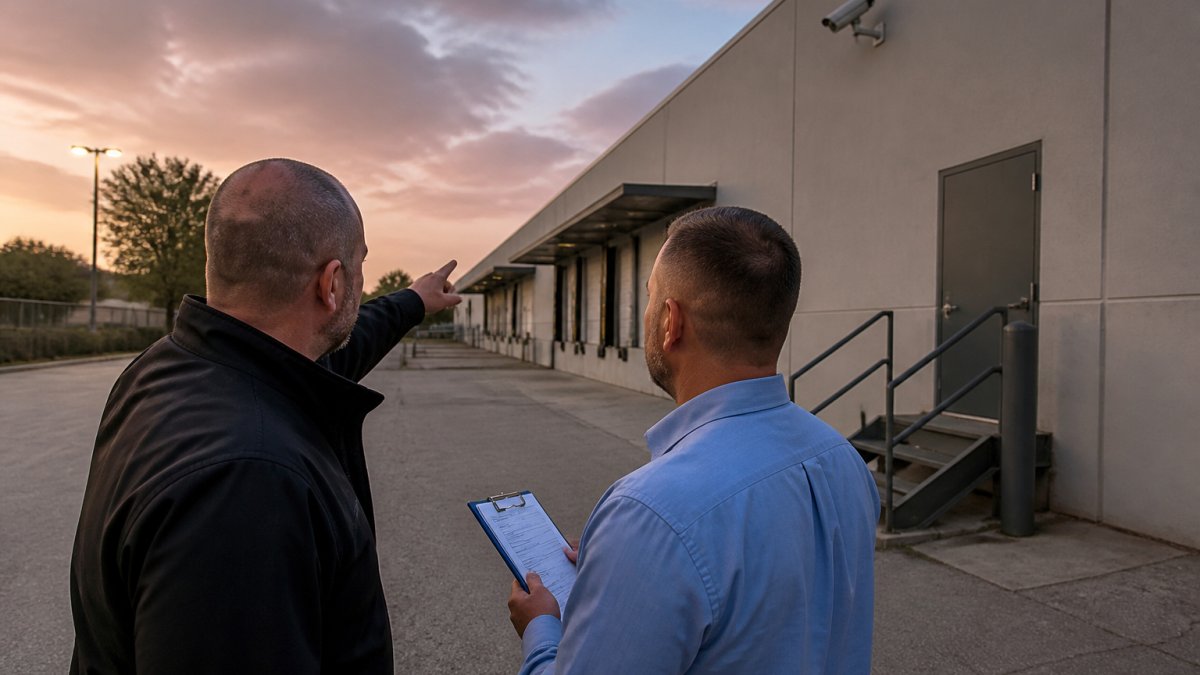
A common mistake is treating the front door as the only entry point. In practice, rear doors, delivery bays, and second-floor windows account for a large share of losses. Map them on paper and mark which ones have a camera, a sensor, or nothing.
Choosing Small Business Security Systems That Scale
Small business security systems should be chosen in layers, so you can add capability without replacing hardware. Start with detection, add visibility, then control who goes where. The goal is a modular stack where each layer can be expanded independently as the business grows.
Intrusion Detection, Cameras, and Access Control
| Layer | What It Covers | Typical Components | Best For |
|---|---|---|---|
| Intrusion detection | Entry attempts and motion | Door and window sensors, motion detectors, glass-break detectors | Every business |
| Video surveillance | Evidence and remote visibility | Indoor and outdoor cameras, CCTV, recording | Retail, warehouses, lots |
| Access control | Who enters and when | Keyless entry, badge readers, door strikes | Offices, dispensaries, restricted areas |
| Monitoring | Human response | Alarm monitoring, mobile alerts, patrol dispatch | Sites empty at night |
Motion detectors and glass-break sensors catch entry attempts; cameras document what happened. Access control limits who can reach high-value areas in the first place. A scalable system keeps these layers modular, so a second location or a new coverage area does not require starting over.
Matching System Type to Business Type
Generic recommendations fail because a restaurant, a warehouse, and a professional office have different risk profiles. Use these patterns as a starting point, then adjust after your risk assessment:
- Retail: prioritize camera coverage of the sales floor, POS stations, and stockroom doors; add door contacts on rear and delivery entrances. Shrinkage and after-hours break-ins are the dominant losses.
- Offices: badge access on exterior doors and server or records rooms, plus cameras at entrances and in cash-handling areas. Interior motion is less useful in spaces with irregular cleaning and maintenance traffic.
- Restaurants: cameras over the register, back door, and walk-in cooler; door sensors on rear exits; and a plan for closing-shift cash handling. Grease, steam, and heat shorten camera life, so specify hardware rated for those conditions.
- Warehouses and storage: perimeter cameras, loading-dock coverage, and access control on man doors. Motion detection in aisles reduces false alarms compared with broad area coverage.
- Service businesses and contractors: vehicle and equipment lot coverage, gate or yard access control, and mobile alerts for after-hours activity. High-value tools are the primary target.
DIY Versus Professionally Installed Systems
DIY systems appeal on price and flexibility: you buy the hardware, install it yourself, and often manage monitoring through a phone app.
Professionally installed systems cost more up front but typically include a site survey, proper mounting and cabling, monitoring integration, and a service relationship when something fails.
A practical middle path is common: professional design and installation for the core alarm and camera backbone, with DIY add-ons for low-risk areas the owner can manage.
Features That Determine Whether a System Scales
- Open standards and integrations: choose equipment that works with common alarm panels and video management software so you are not locked into one vendor's add-ons.
- Remote management: cloud or app-based administration lets you add users, adjust schedules, and view cameras without a site visit.
- Storage strategy: local recording with cloud backup balances cost and resilience; cloud-only recording simplifies management but depends on bandwidth.
- User and permission tiers: role-based access lets you give managers broader rights than front-desk staff without reconfiguring hardware.
- Expansion capacity: confirm the panel and recorder support more zones and cameras than you need today. Adding a second building is far cheaper when the head-end equipment has spare capacity.
Where Commercial Security Guards Fit Your Plan
Commercial security guards cover what technology cannot: judgment, presence, and immediate response. Cameras record; a trained officer intervenes, verifies, and reports.
Guards earn their cost in specific situations. For a dispensary or a construction site with high-value equipment, it is often the difference between a plan and a hope.
The thing nobody tells you about guard coverage is that consistency matters more than headcount.
Mobile Patrol Security for Businesses With Multiple Sites
Mobile patrol security for businesses sends marked vehicle patrols on scheduled and randomized checks. It suits operators who need a visible presence across several locations without a full-time officer at each one.
Patrols work best as a layer on top of monitoring, not a replacement. A patrol can check lockups, verify alarm activations, and log conditions at each site. Randomized timing matters: predictable patrols let someone learn the schedule.
Budgeting and Total Cost of Ownership
Budget the whole lifecycle, not the install. Total cost of ownership for a small business security system includes equipment, installation, monitoring fees, maintenance, and the staff time spent managing alerts. Most owners compare only the first two and are surprised by the recurring line items.
The Five Cost Buckets
- Equipment. Cameras, recorders, sensors, panels, access-control readers, and cabling. Itemize by device so you can compare quotes line by line.
- Installation. Labor, mounting, cabling, network configuration, and commissioning. Professional installation typically costs more than the hardware itself for camera-heavy systems.
- Monitoring. Monthly or annual fees for alarm monitoring and, separately, video or cloud storage. Contract length and cancellation terms matter as much as the monthly rate.
- Maintenance and service. Scheduled inspections, camera cleaning, firmware updates, battery replacement, and service-call rates. Ask whether service calls are included or billed hourly.
- Internal time. Staff hours spent arming, disarming, reviewing footage, and responding to alerts. This is invisible on a quote but real on a payroll.
Sample Budget Frameworks by Business Size
Exact prices vary by site, but the proportions are consistent enough to plan against. Use these frameworks to sanity-check quotes rather than as fixed prices.
- Single small office or studio (under 2,000 sq ft): a basic alarm panel with door contacts and motion, two to four cameras, and app-based monitoring. Expect equipment and installation to be the largest one-time cost, with monitoring as a modest recurring fee. A DIY kit can cut the one-time cost but shifts configuration and maintenance onto the owner.
- Retail storefront or restaurant (2,000-5,000 sq ft): eight to sixteen cameras, door and motion sensors, a recorder with cloud backup, and professional monitoring. Installation labor and cabling become a larger share of the total. Budget for camera cleaning and one service call per year.
- Warehouse or multi-building site: perimeter and dock cameras, access control on man doors, and possibly mobile patrol. Equipment and installation dominate, and maintenance contracts are worth pricing because camera counts are high and failures are costlier to ignore.
A useful rule of thumb: compare quotes on a three-year total, not a first-year total.
Comparing Quotes on Equal Footing
- Equipment cost, itemized by device
- Professional installation versus DIY system trade-offs
- Monthly monitoring fee and contract length
- Service call and maintenance charges
- Response time commitments and escalation process
- Training for staff on arming, disarming, and reporting
- Exit terms and equipment ownership
Ask each provider to quote the same scope, then compare the multi-year total. Pricing depends on site size, coverage areas, and service frequency, so request a written quote rather than relying on a ballpark.
Vetting a Provider and Keeping the Plan Effective
Vetting a security provider comes down to proof: licensing, insurance, training standards, and a reporting process you can audit.
Consistency is the question we hear most. The answer should be structural: documented post orders, supervisory checks, and regular performance reviews, not a promise.
Then keep the plan alive. Review your risk assessment annually, re-test cameras and sensors, and update the plan when you add a location, change hours, or bring on new staff.
Frequently Asked Questions
How much do custom security solutions for small businesses cost?
Pricing depends on the components you choose, the size and layout of your property, hours of coverage, and whether you need armed or unarmed personnel. A single-site retailer with cameras and alarm monitoring sits at a very different budget than a dispensary requiring armed guards around the clock. Rather than quote a generic figure, a provider should walk your property, document the risks, and build a line-item proposal. Request a free quote so the numbers reflect your actual coverage areas instead of a package that was designed for someone else.
What should a small business security risk assessment cover?
A thorough business security risk assessment reviews entry points, lighting, alarm and camera placement, cash and inventory handling, employee access levels, and after-hours exposure. It should also weigh response time from local law enforcement and whether 24/7 monitoring or on-site guards close the gap. Document findings in writing so you can prioritize fixes by cost and impact. Repeat the assessment annually and after any layout change, new hire class, or incident, because a plan built for last year's operation rarely matches this year's.
Can a small business combine cameras, alarms, and security guards?
Yes, and the strongest plans usually do. Small business security systems handle detection and recording, professional monitoring triggers a response, and commercial security guards provide a visible deterrent and on-site judgment that sensors cannot. Integration matters: guards should receive mobile alerts from your alarm system, and camera footage should be reviewable during an incident, not after. Ask your provider how the components talk to each other and who owns the reporting when something goes wrong at 2 a.m.
Are security guards worth it for a small business?
It depends on what you are protecting. A boutique with low cash exposure may do fine with cameras and monitoring, while a dispensary, construction site, or manufacturing plant with high-value assets often needs an armed or unarmed presence to prevent losses that equipment alone cannot stop. Guards also handle crowd management, access verification, and incident reporting. Compare the annual cost of coverage against your actual loss history and insurance requirements, then decide. A free quote and a documented risk assessment make that comparison concrete.
Every small business has a gap a generic system will miss. Securify Security Services builds custom security solutions around your property, with armed, unarmed, and vehicle patrol coverage, 24/7 support, and officers who pass rigorous background checks and continuous performance evaluation. Get a free quote and find out what a plan built for your site actually looks like.